A role list as long as your org chart
The AWS SAML sign-in page lists every account and role you have in one long, unsorted column of radio buttons.
Filters, tags, search and favourites find the role in a keystroke.
Free Chrome extension for AWS SAML sign-in
Console Hopper turns the AWS SAML role picker into a searchable launcher, opens every console a ticket needs in one click, and shows you AWS's five-session limit before you run into it.
Open source (MIT)No telemetryNo account

If your company reaches AWS through an identity provider and a Landing Zone, you know these three by heart.
The AWS SAML sign-in page lists every account and role you have in one long, unsorted column of radio buttons.
Filters, tags, search and favourites find the role in a keystroke.
Every AWS console tab has the same icon and a near-identical title. Which one is production?
Env-coloured tab icons, the account name in every title, and tab groups.
AWS allows five console sessions per browser, and only tells you once you're already stuck.
A live counter, and a list of sessions to sign out before you hit the wall.
Console Hopper takes over the AWS role picker and the console tabs it opens. Nothing else in your browser changes.
Filter by organisation, environment, account type, role name or your own tags. Every filter row stays on one line, and you order the chips by dragging.
Search matches account names, ids and roles, ignores separators (test 123 finds test123), and takes scoped terms:
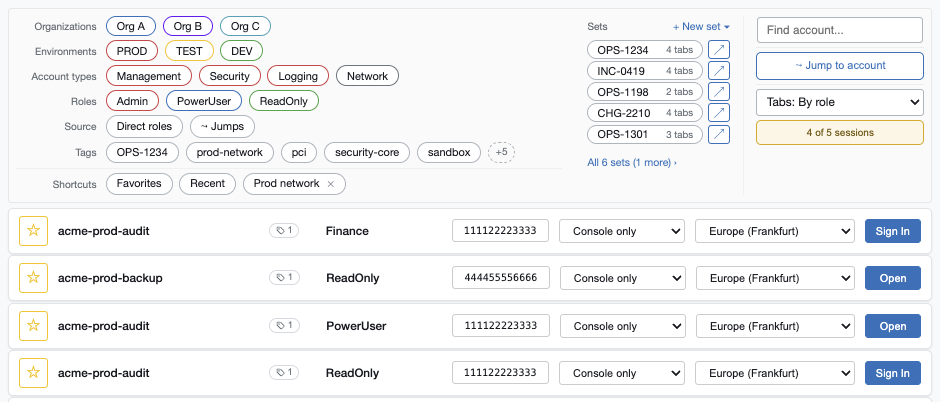
Launch Sets save the console tabs a piece of work needs under a name, usually the ticket id. Each tab keeps its own role, landing service and region, and one role can have several tabs.
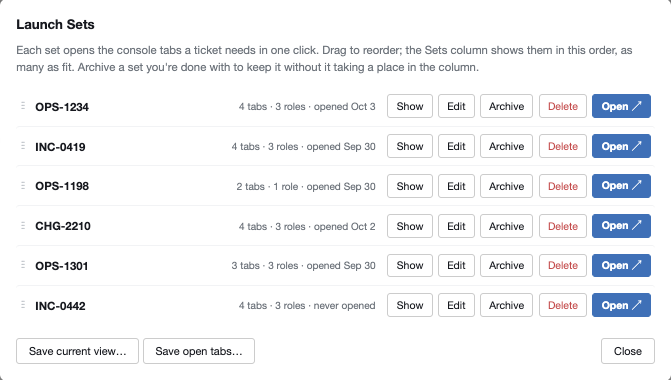
AWS allows five console sessions per browser profile. A counter in the role picker turns amber with one slot left and red when full. Open it to see every session's account, role, region, tab group, age, time left and open tabs.
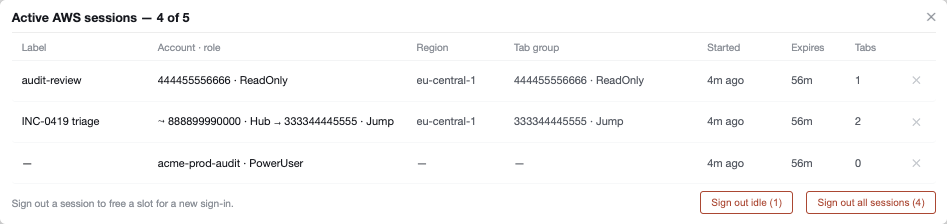
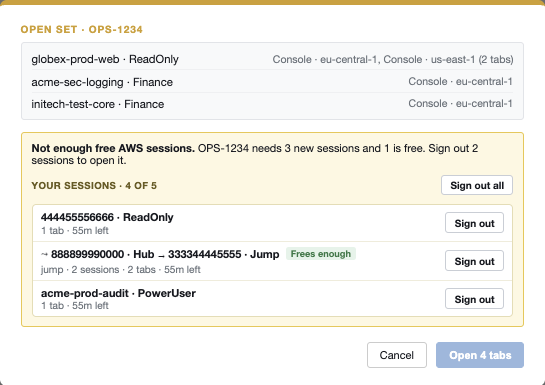
Some accounts you can only reach by assuming a role from a hub account. Set each organisation up once in Jump Profiles, then type the account id you need.
888899990000 · Hubpre-filled, one clickeu-central-1 · "INC-0419 triage"An optional session label becomes the new tab's title, and recent jumps are one click away.
Every console tab Console Hopper opens gets an env-coloured icon and the account name at the front of its title, so ten open consoles stay readable at a glance.
Pick EC2, S3, IAM or your own entry before signing in, and land in that console instead of the home page.
Each row has a region menu that remembers your last pick for that role.
Label an account and role with pci, prod-network or a ticket number, inline with autocomplete.
/ or ⌘K to search, ↑↓ to move, Enter to sign in, ⌘+Enter for a new tab.
A confirmation before signing in to admin roles or the account types you choose.
Click the account id on any row to copy all twelve digits.
Export your settings as JSON and a teammate imports them. One person sets it up, and the whole team has it.
One click signs you out of every AWS console and keeps your console settings.
Follows your system theme, with a compact mode for long lists.
Everyday AWS console chores, done on the plain sign-in page and done with Console Hopper.
| You want to… | AWS sign-in page alone |  With Console Hopper With Console Hopper |
|---|---|---|
| Find one role among hundreds | Scroll the list and read every account name | Type a few letters, or click a filter chip |
| Open the four consoles a ticket needs | Four trips through the role picker, then find each service and region | One click on the ticket's Launch Set |
| Land in the right service and region | Start on the console home page and navigate from there | Pick both on the row before you sign in |
| Know how many sessions you have left | Find out from AWS's "Session limit reached" page | A counter, with sign-out right in the picker |
| Reach an account through a hub | Sign in to the hub, open Switch Role, type the account and role | Type the account id, then one click on the pre-filled Switch Role |
| Tell production tabs from test | Open the account menu in each tab to check | Coloured tab icons and the account name in every title |
| Stay in the region you work in | Global consoles like IAM send the next tab to your default Region | Each tab keeps its own region |
If you sign in to AWS through SAML more than a few times a day, it's for you.
Dozens or hundreds of accounts across organisations and environments. Filter by organisation, environment and account type, tag roles by team, and give everyone the same setup as one JSON file.
Several organisations' accounts in a single day. Rename accounts to names you recognise, group tabs by organisation, and reach accounts behind a hub with Jump Profiles.
Seconds matter when something breaks. Keep a Launch Set per runbook, open every console it needs in one click, and always see which tab is production.
No account and no server. Your settings live in your browser.
Install Console Hopper from the Chrome Web Store. It's free.
Go through your identity provider. The AWS role picker you land on is now Console Hopper.
In any AWS console tab, choose your account name at the top right, then Turn on multi-session support. The session features need it.
Import the Landing Zone sample, or a teammate's exported settings.
Everything you can type into Console Hopper, on one page.
Search ignores separators, so test 123 finds test123. Focus the box for click-to-insert suggestions and a live match count.
vpc | A bare word matches account name, id, role and tags |
role:admin | Search one field: tag: role: name: id: account: env: type: org: |
env:prod tag:pci | A space means and |
env:prod,test | A comma means or |
-role:admin | A leading minus excludes |
"prod network" | Quotes match the exact phrase |
is:jump | Only your saved jump destinations |
| / or ⌘K | Search |
| ↑ ↓ | Move through roles |
| Enter | Sign in to the selected role |
| ⌘Enter | Sign in, in a new tab |
| ⌥ + arrows | Walk the search suggestions |
| Esc | Close, deselect, then clear every filter |
On Windows and Linux, use Ctrl for ⌘ and Alt for ⌥. ⌘-click or middle-click on any role also opens it in a new tab.
One line per organisation, under Jump Profiles in the side menu: name, hub account, the role to assume, and an optional region. Add /HubRole to the hub account when you have more than one role there.
Acme Prod | 111111111111/HubRole | OrgAdmin | eu-central-1
Acme Dev | 222222222222 | OrgAdmin
The hub role has to be in your role list, and the destination role has to trust it already. Console Hopper doesn't create roles or change trust policies. AWS caps role-chained sessions at one hour.
Every feature and setting is described in the README on GitHub.
Console Hopper has no server to send anything to. It runs only on AWS sign-in and console pages, and the only requests it makes go to AWS itself.
The code is open source, so you don't have to take our word for it.
*.aws.amazon.comThe SAML sign-in page and AWS console tabs. No access to any other site.The AWS SAML sign-in page, which is the role picker at signin.aws.amazon.com/saml that your identity provider (Okta, Microsoft Entra ID, ADFS, Ping and others) sends you to. It doesn't change the IAM Identity Center access portal.
Without it, AWS holds one console session at a time and each sign-in replaces the last, so there's nothing for the session counter, Open or multi-role Launch Sets to work with. AWS leaves it off until you turn it on: choose your account name at the top right of any console tab, then Turn on multi-session support. While it's off, Console Hopper's counter says so.
Yes. Configure your organisations, environments, tags and jump profiles once, use Export Settings to copy them as JSON, and teammates paste it into Import Settings. Nothing is hard-coded to any company.
Yes. It's published on the Chrome Web Store, so it can be added to your organisation's extension allow-list by its id: cadmkfcpkklbeangcbkckpniooaedcpp. It asks only for storage, tabs, tabGroups, cookies and access to aws.amazon.com and its subdomains.
It's built and tested for Google Chrome. Other Chromium browsers that install extensions from the Chrome Web Store may work, but they aren't tested. There's no Firefox version.
No. Settings stay in this Chrome profile's local extension storage and aren't synced anywhere. To move them, use Export Settings on one computer and Import Settings on the other.
The hub role has to be in your role list, and the role you jump to has to trust it already. Console Hopper only fills in AWS's own Switch Role form; it doesn't create roles or change trust policies. AWS caps role-chained sessions at one hour.
Yes. It's open source under the MIT licence, with no account, no paid tier and no ads. Issues and pull requests are welcome on GitHub.
No. Console Hopper is an independent project and isn't affiliated with or endorsed by Amazon Web Services.

Install Console Hopper, sign in through your identity provider as usual, and the role picker is a launcher from then on.